
Teaching programming to children empowers the next generation to move from being passive consumers of technology to active creators of the digital landscape. Rather than simply scrolling through apps, children who learn to code begin to understand the “why” and “how” behind the software they use daily. This foundational knowledge functions much like a superpower, turning a standard tablet or computer into a tool for innovation, creative expression, and critical thought.
Why Coding is the Essential “Third Language” for Kids in Egypt
Coding serves as a universal dialect that transcends borders, providing Egyptian children with a competitive edge in a globalized workforce. Just as learning a foreign language expands a child’s communication skills, programming refines their logic development and ability to articulate complex ideas.
Think of coding as the modern equivalent of learning a musical instrument; it requires practice, rhythm, and an understanding of how small notes (lines of code) come together to create a symphony (a functional program). Beyond technical proficiency, this pursuit fosters:
Computational Thinking:
This involves breaking down a massive problem into bite-sized, manageable pieces—a skill applicable to everything from math homework to organizing a school project.
Enhanced Problem-Solving Skills:
In the coding world, failure isn’t a dead end; it’s a data point. Children learn to analyze why a script didn’t work and find a creative workaround.
Early STEM Education Exposure:
By engaging with code, children naturally encounter concepts of physics, geometry, and data analysis in a hands-on environment.

Teaching Programming to Children: A Roadmap by Age Group
The approach to instruction must evolve alongside a child’s cognitive development to ensure they remain engaged without feeling overwhelmed.
Ages 5-7: Cultivating Logic Through Play (Unplugged & ScratchJr)
At this stage, the goal is to introduce algorithm basics without necessarily needing a screen. Before a child can write a line of Python, they must understand that an algorithm is simply a sequence of instructions, much like the steps in a sandwich recipe.
- Visual Programming: Tools like ScratchJr use colorful icons rather than text, allowing pre-readers to “snap” actions together.
- Logic Development Games: Using physical cards or floor grids to “program” a parent to walk across the room helps internalize the concept of sequential thinking.
- Screen Time Productivity: At this age, the focus is on high-quality interaction where the child is the director, not just a viewer.
Ages 8-12: The Mastery of Block-Based Coding
This is often considered the “Golden Age” for young learners. They have the patience to experiment and the curiosity to build complex systems.
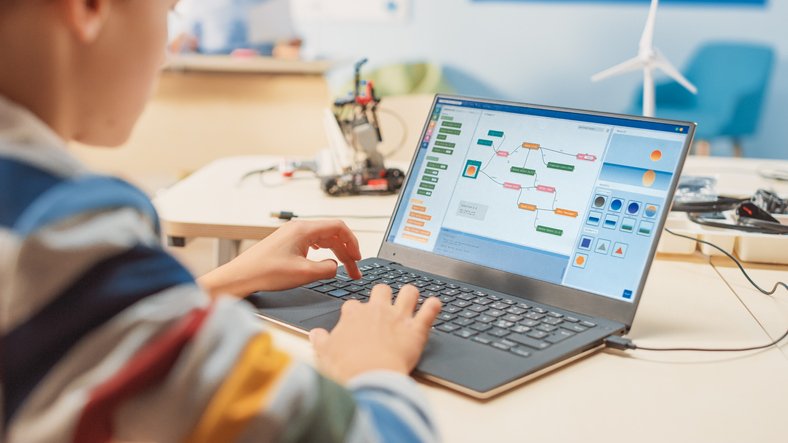
- MIT Scratch: This platform allows kids to create animations and games using a drag-and-drop interface, removing the frustration of syntax errors (like missing a semicolon).
- Educational Games: Platforms like Minecraft (Education Edition) and Roblox (via Lua) turn leisure time into a lab for block-based coding.
- Debugging for Beginners: Children start learning how to “troubleshoot” their creations, a process that builds immense resilience and patience.
Ages 13+: Transitioning to Real-World Syntax (Python, Web Dev)
As teenagers develop more abstract thinking capabilities, they can move away from visual blocks and into text-based languages.
- Python for Teens: Python is the preferred starting point because its syntax closely resembles the English language, making it accessible for building data tools or simple AI models.
- Digital Literacy: Students begin to understand the ethics of technology, data privacy, and the impact of software on society.
- Web Development: Learning HTML, CSS, and JavaScript allows teens to build their own corner of the internet, showcasing their portfolios or hobbies.
Read also about: Python for Kids
Top Platforms for Home-Based Learning
Choosing the right tool depends on your child’s current interests and your budget.
| Platform | Recommended Age | Primary Focus | Difficulty Level |
| ScratchJr | 5-7 | Visual programming | Introductory |
| MIT Scratch | 8-12 | Game design & Logic | Intermediate |
| Code.org | 6-18 | STEM education fundamentals | Mixed |
| Tynker | 7-15 | Block-based coding in Python | Intermediate |
| Codecademy | 13+ | Python for teens & Web Dev | Advanced |
Beyond the Screen: Robotics and Hardware Integration
Programming becomes tangible when a child sees their code move a physical object. Robotics integration bridges the gap between the digital and physical worlds, making the abstract feel real.
- Micro:bit: A tiny, programmable computer that can be turned into a watch, a step counter, or even a soil moisture sensor for a plant.
- Arduino Projects: For older children, Arduino offers a gateway into engineering and electronics, allowing them to build remote-controlled cars or home automation gadgets.
- The LEGO Analogy: Just as building a LEGO castle requires a sturdy foundation, hardware programming teaches children that the physical structure (the hardware) is only as good as the instructions (the code) provided to it.
Know more about: Programming Course Price for Kids
Overcoming Common Learning Obstacles
The journey isn’t always smooth, and many children hit a “frustration wall” when their code doesn’t execute as expected. The key is to keep the environment low-pressure and high-reward.
- Avoid Forced Learning: If a child is tired or frustrated, step away. Coding should feel like a hobby, not a chore.
- Focus on the “Why”: Instead of just following a tutorial, ask the child, “What happens if we change this number?” This encourages exploration.
- Gamify the Experience: Use educational games that reward logic and persistence to keep motivation levels high.
Expert Advice: Finding the Right Coding Center in Egypt
When looking for an external course or center, prioritize the quality of mentorship over the brand of the hardware.
- Project-Based Curriculum: Does the center focus on memorizing code, or do students finish the course with a project they built themselves?
- Instructor Expertise: Ensure the teachers understand the pedagogy of teaching children, which is vastly different from training adults.
- Small Class Sizes: Programming requires one-on-one “debugging” time; a teacher cannot effectively manage 30 students at once.
Enroll now in programming courses at Stemate Academy and watch your children build their future, one line of code at a time.
FAQ
What is the best age for a child to start learning programming?
Most experts suggest starting around age 5 or 6 with “unplugged” activities or ScratchJr. However, there is no “wrong” time to start; even teenagers can quickly catch up by starting with Python for Teens.
Does my child need to be good at math to learn coding?
Not necessarily. While coding and math share logical foundations, coding often helps children improve at math by giving them a practical application for abstract numbers. It’s more about logic development than arithmetic.
Which language is better for beginners: Scratch or Python?
For children under 12, MIT Scratch is usually better because it allows them to focus on logic without worrying about typing errors. For older children or those who have mastered logic blocks, Python is the ideal next step.